


Zoom Meetings
cancel
Showing results for 
Search instead for 
Did you mean: 

What are Zoom Meetings?

Zoom Meetings are a simplified video conferencing solution for an optimized virtual meeting experience. Explore the Zoom Community's Recent Activity below to join the Meetings conversation and connect with other members. If you're still looking for support, browse our Zoom Meetings support articles or start a new discussion below!

Recent Activity

Cannot log in

I receveid an email saying that my zoom login was compromised. I reset it and could not log in. I reset it again, and again. In time, I was locked out for "30 minutes."


Twelve hours later I am still locked out. Such an inconvenience.

reply-icon Latest Reply - 

Share Screen

Meeting screen sharing suddenly requires participants to have an account login in order to share

reply-icon Latest Reply - 

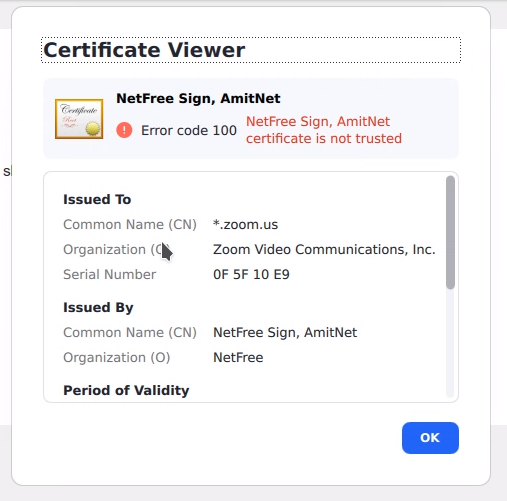
Linux issue: certificate error on flatpak version of Zoom meetings

I have a root certificate from Netfree that is installed on my system, which is Kubuntu 22.10.I installed the flatpak version of Zoom, and the certificate is not recognized.This issue is specific to the flatpak version, because on the .deb version of... Show more

I have a root certificate from Netfree that is installed on my system, which is Kubuntu 22.10.

I installed the flatpak version of Zoom, and the certificate is not recognized.

This issue is specific to the flatpak version, because on the .deb version of Zoom, the certificate is correctly recognized.

See screenshot for details of the error. 

Screenshot_20230417_110835.png


Show less

no china option under global dail-in countries/regions

Hi,

I want to edit the phone call information, as the default region is United states, while i am in CHINA.

But the drop down list no CHINA option.

reply-icon Latest Reply - 

Resolved! two accounts, one desktop

Hello! I have two businesses, one my own and one am doing work for. both with extensive zoom chat as primary means of communication. I need to have 2 zoom apps on my desktop, logged into 2 separate accounts for the notifications. I cannot seem to fig... Show more

Hello! I have two businesses, one my own and one am doing work for.  both with extensive zoom chat as primary means of communication.  I need to have 2 zoom apps on my desktop, logged into 2 separate accounts for the notifications.   I cannot seem to figure out how this is possible, but hoping that it is.   any assistance greatly appreciated!


Show less

reply-icon Latest Reply - 

Share a small part of the screen

Is there a way to share, while presenting, a small part of only one window


There is an option to share only one window, and another one to share a small part of the screen. But is there a way to combine both

Thank you ! 

reply-icon Latest Reply - 

Zoom Connectivity Issues

Hi Team,I am using my hp zoom account for project meetings. I have installed the zoom application in my work laptop and having issues in connectivity. The first time login after a new installation works fine where as not able to connect to zoom app (... Show more

Hi Team,

I am using my hp zoom account for project meetings. I have installed the zoom application in my work laptop and having issues in connectivity. The first time login after a new installation works fine where as not able to connect to zoom app (it keep says connecting message but the account validation doesn't happens) after the laptop restart. I tried multiple times uninstall and installing the app but the same issue persists. Can you help in resolving this issue at earliest?

Thanks,

Raju


Show less

Resolved! ビジネスプランからプロプランへのダウングレードが出来ない

ビジネスプランからプロプランへのダウングレードをしたいのですが出来ません。

以下の操作をしました。

ビジネスプラン(自動更新)⇒自動更新を停止(完了)

料金プラン画面から「プロへダウングレード」をクリック

⇒現在のプランが表示される。

そこに「現在のプランの編集」という表記が出てきません。

reply-icon Latest Reply - 

ミーティング招待メールの開始時間表示について

こんにちは、Zoom コミュニティへ初めて投稿します。ルールを守っていない場合はご容赦ください。Zoomイベント主催者としてスケジュール設定を行う際、マイクテスト等で早めに入室し、招待者にはミーティング開始時間(30分後)に随時参加承認をしたいと思ったのですが、 例えばZoomスケジュール設定を、2023年3月23日 02:30PMで設定したとします。ミーティングイベントは3:00PMスタートとしたい場合 Zoomの事前登録機能を使用して登録をした方への自動返信メールでは、スケジュールの下に午後... Show more

こんにちは、Zoom コミュニティへ初めて投稿します。ルールを守っていない場合はご容赦ください。

Zoomイベント主催者としてスケジュール設定を行う際、マイクテスト等で早めに入室し、招待者にはミーティング開始時間(30分後)に随時参加承認をしたいと思ったのですが、


例えば

Zoomスケジュール設定を、2023年3月23日 02:30PMで設定したとします。

ミーティングイベントは3:00PMスタートとしたい場合


Zoomの事前登録機能を使用して登録をした方への自動返信メールでは、スケジュールの下に午後3時からと注意書きを記載しても気づかれない場合があり、2:30からずっと承認待ち状態で入れないとの連絡が来てしまいます。

この件、自動返信メールでアクセスURLを送る際、スケジュールで登録した時刻ではなく、任意の開始時刻をメールに自動返信するにはどうしたら良いでしょうか。

自動返信メールでの表示(フォントの大きさ、強調など)のカスタマイズは出来ますでしょうか。

誤解が生じない方法をお教えいただきたくお願いいたします。


Show less

reply-icon Latest Reply -