

Concurrent meetings and Webinars | Community
Skip to main content
Newcomer
May 20, 2022
Solved

Concurrent meetings and Webinars

  • May 20, 2022
  • 2 replies
  • 5 views

I currently have a Pro license, and I'm running an upcoming event that will have both concurrent Meetings and concurrent Webinars. I know I need individual licenses for each one that runs concurrently, but I'm trying to figure out if I can simultaneously run a Meeting and a Webinar using the same account/email address, presuming I have the Webinar add-on.  I won't be presenting--just the behind-the-scenes administrator for all of the sessions.  
 

    Best answer by Ray_Harwood

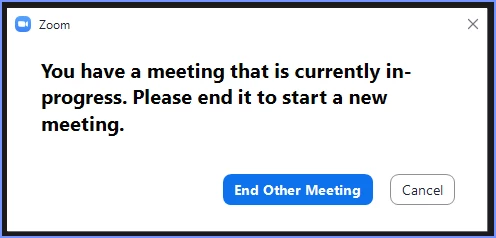
    Sorry. @JR87  -- one user can only host one event at a time.  If you start another event, you are given the option as shown here:

    At that point, you can either force-end the other meeting, and the new one you wanted to start will start, or you can cancel and allow the other meeting to continue.


    Are these Meetings and Webinars all related to each other, like separate sessions in a single "big event"?  There's an option: Zoom Events.  It's not for the faint of heart, but it's only $20/month over the Webinar license, and allows you to have a wide range of sessions all in one Event/Conference.  But setting it up is tricky.  If you're going to be doing this a lot, though, it's worth investigating.


    If you're interested, I'll drop in some additional information. 

    2 replies

    Ray_Harwood
    Community Super Champion | Customer
    Community Super Champion | Customer
    May 20, 2022

    Sorry. @JR87  -- one user can only host one event at a time.  If you start another event, you are given the option as shown here:

    At that point, you can either force-end the other meeting, and the new one you wanted to start will start, or you can cancel and allow the other meeting to continue.


    Are these Meetings and Webinars all related to each other, like separate sessions in a single "big event"?  There's an option: Zoom Events.  It's not for the faint of heart, but it's only $20/month over the Webinar license, and allows you to have a wide range of sessions all in one Event/Conference.  But setting it up is tricky.  If you're going to be doing this a lot, though, it's worth investigating.


    If you're interested, I'll drop in some additional information. 

    JR87Author
    Newcomer
    May 20, 2022

    Thanks @Ray_Harwood .  Bummer that I can't run a concurrent meeting and webinar, but I get it. We've already committed to a virtual platform that integrates with Zoom, so Zoom Events won't work for us at this point.  

    Ray_Harwood
    Community Super Champion | Customer
    Community Super Champion | Customer
    May 20, 2022

    Too bad. Well, the good news is that you can use your Webinar license, and then add one additional user account to your organizational account, and just pay for one month of Pro, then let it ride as a Basic account til you need it again.  I’m a solo one-person event producer, and I’ve got 5 accounts ready to use as needed. 

    Newcomer
    June 5, 2023

    Hey I saw your post. We have purchased a Zoom events package in order to run concurrent sessions (alongside other things) but I'm struggling to create an event at all and can't find any advice for this online. It just doesn't give me the drop down option to create event...


    Thanks, Sophie

    Ray_Harwood
    Community Super Champion | Customer
    Community Super Champion | Customer
    June 5, 2023

    @servicesteam/Sophie,


    Welcome to Zoom Events!  I've sent you a private message with some information.


    Zoom Events creation isn't "rocket science or brain surgery", but it's certainly at huge leap from your everyday Meeting or Webinar. There are a variety of resources out there, including:

    See my PM for additional details.