
Banners on Zoom Webinar | Community
Skip to main content
Newcomer
August 25, 2023
Solved

Banners on Zoom Webinar

  • August 25, 2023
  • 6 replies
  • 0 views

Hi! I created a zoom webinar that originally had a banner image and then both the image and banner upload option disappeared from the branding section. Is anyone else having this problem that can help? 

    Best answer by TamieN

    You have to have your Admin if you are not one go into their settings. 

    Once that is enabled your banners and logos will reappear.  They will be under the newer items on the branding tab. 
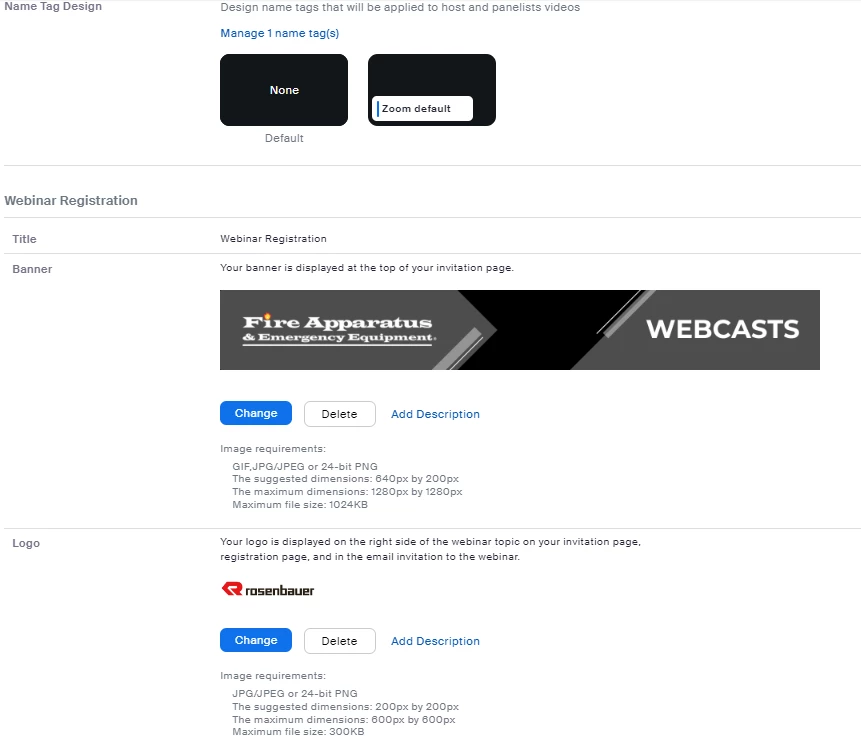
    Hope this helps! 

    Tamie

    6 replies

    Newcomer
    August 25, 2023

    Hi, I'm experiencing the same problem.  Yesterday the banner and logo appeared on the registration page, and today both the banner and the logo have disappeared.  Additionally, the options under branding to upload the banner and logo are no longer available.  Is this a known issue, can someone help?

    TamieN
    Explorer
    Explorer
    August 30, 2023

    There is a new setting that has to be switched by an admin to get them back. 


    Newcomer
    August 31, 2023

    Hello! Can you give me more details on where I can find this option? I am an administrator and I can't find where to modify that option or how to find it in the configuration.

    Partner
    August 28, 2023

    I have the same issue. Seems like Zoom makes admin can control the banner and logo but this is insane.  Every single webinar supposed to have their own banner. This is ridiculous. I found that the meeting registration still have that function!! Zoom should roll back this feature. 

    TamieN
    Explorer
    Explorer
    August 30, 2023


    see the image above, needs to be swtiched on by an admin.


    Newcomer
    August 28, 2023

    Same thing has happened to us. I lost the ability to add logo or banner, but I can still modify themes, etc... Any reason why this would be happening? 

    TamieN
    Explorer
    Explorer
    August 30, 2023

    see the image below, needs to be switched on by an admin. 


    TamieN
    Explorer
    TamieNAnswer
    Explorer
    August 29, 2023

    You have to have your Admin if you are not one go into their settings. 

    Once that is enabled your banners and logos will reappear.  They will be under the newer items on the branding tab. 

    Hope this helps! 

    Tamie

    Partner
    August 30, 2023

    Thanks Tamie, When I tested it didn't work but now it's working. Thanks for helping me. 

    Newcomer
    October 17, 2023

    Ad blockers will also remove the banner portion of the webinar registration branding. Hope this also helps someone down the line.