Zoomtopia is here. Unlock the transformative power of generative AI, helping you connect, collaborate, and Work Happy with AI Companion.
Register nowEmpowering you to increase productivity, improve team effectiveness, and enhance skills.
Learn moreKeep your Zoom app up to date to access the latest features.
Download Center Download the Zoom appDownload hi-res images and animations to elevate your next Zoom meeting.
Browse Backgrounds Zoom Virtual BackgroundsEmpowering you to increase productivity, improve team effectiveness, and enhance skills.
Zoom AI CompanionUser groups are unique spaces where community members can collaborate, network, and exchange knowledge on similar interests and expertise.

Help & Resources is your place to discover helpful Zoom support resources, browse Zoom Community how-to documentation, and stay updated on community announcements.
The Events page is your destination for upcoming webinars, platform training sessions, targeted user events, and more. Stay updated on opportunities to enhance your skills and connect with fellow Zoom users.
2023-01-27 10:15 AM
How can I disable dual monitors in Zoom? I don't see the setting option when I click on my picture. Nor do I see it in the settings.
2023-01-27 10:28 AM
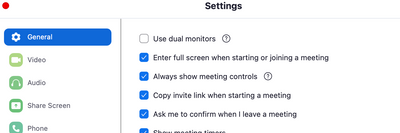
Its under Settings -. General
2023-02-20 07:11 AM
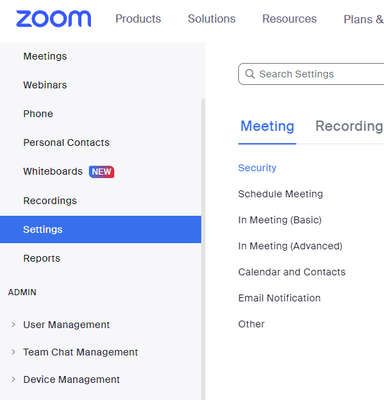
I'm trying to change the setting you referenced. Where do I find general settings?? Mine looks nothing like that..
2024-03-12 02:18 PM
I was having the same issue and discovered that there appear to be two separate ways to get into settings. If you go to the website directly you get the menu that you shared. If you go into a meeting and then sign in it should pop up a secondary window. Click on your picture on the top right and click settings. That menu appears like the one the Sachinzoom shared above.
2024-10-17 08:57 AM
Thank you for actually answering the question! 😁
2025-10-11 02:45 PM
I still can't find it. When I go into a meeting, I'm never asked to sign in and I never have a picture at the top right. So, no general settings within the meeting. If I go to the Zoom app from the meeting, I do have my picture and settings, and general, but nothing about dual monitors. (Appearance, Navigation bar, Zoom Workplace App, Presence status, Zoom rooms, Auto-call & Zoom Apps). I know, TMI. On the website, I have Settings, General but nothing about a dual monitor.
The reason is that this setting apparently disables the Presenter Layout settings when I'm sharing my screen.
2025-11-14 02:23 AM
FOUND IT! After spending almost 1 hour in total looking for this setting, I found it.
Search in settings "meeting window view" or:
Zoom Desktop App > Settings > Meeting & Webinars > In-meeting and in-webinar experience ("Display") > choose: **Single window with tabs**.
It's so annoying that sometimes Zoom app decides to turn this back on!!
Hope this can help somebody else!
2024-04-04 10:26 AM
Thank you!
2025-01-05 09:26 AM
You can also go into "account management" on the left side of your screen, then
account settings", then "general". I never could find the "use dual monitors" button.